You need to run a SQL query against a local SQLite database. Your options: open Terminal and use the sqlite3 CLI with no syntax highlighting and no auto-complete, or launch a full database IDE that takes ten seconds to start and uses half a gigabyte of RAM. Neither option fits the task — you just want to write a query, run it, and see the results.
The Gap Between Terminal and Full IDEs
The sqlite3 CLI gives you raw query execution but zero developer comfort. No syntax coloring, no completion of table or column names, no visual results grid. You're reading query output as plain text, manually adjusting your terminal width to see all columns.
On the other end, tools like DataGrip or DBeaver are built for enterprise database workflows — managing connections to remote servers, handling migrations, visualizing schemas. They're powerful, but they're heavy. For a local SQLite file, launching a full IDE feels like driving a semi truck to the corner store.
What's missing is a fast, focused SQL editor that opens a SQLite file and lets you write queries with the comfort features you expect — without the overhead of a full IDE.
Tome's SQL Query Editor
Tome includes a built-in SQL query editor designed specifically for SQLite. It's part of a native macOS app, so it launches instantly and runs with minimal resource usage.
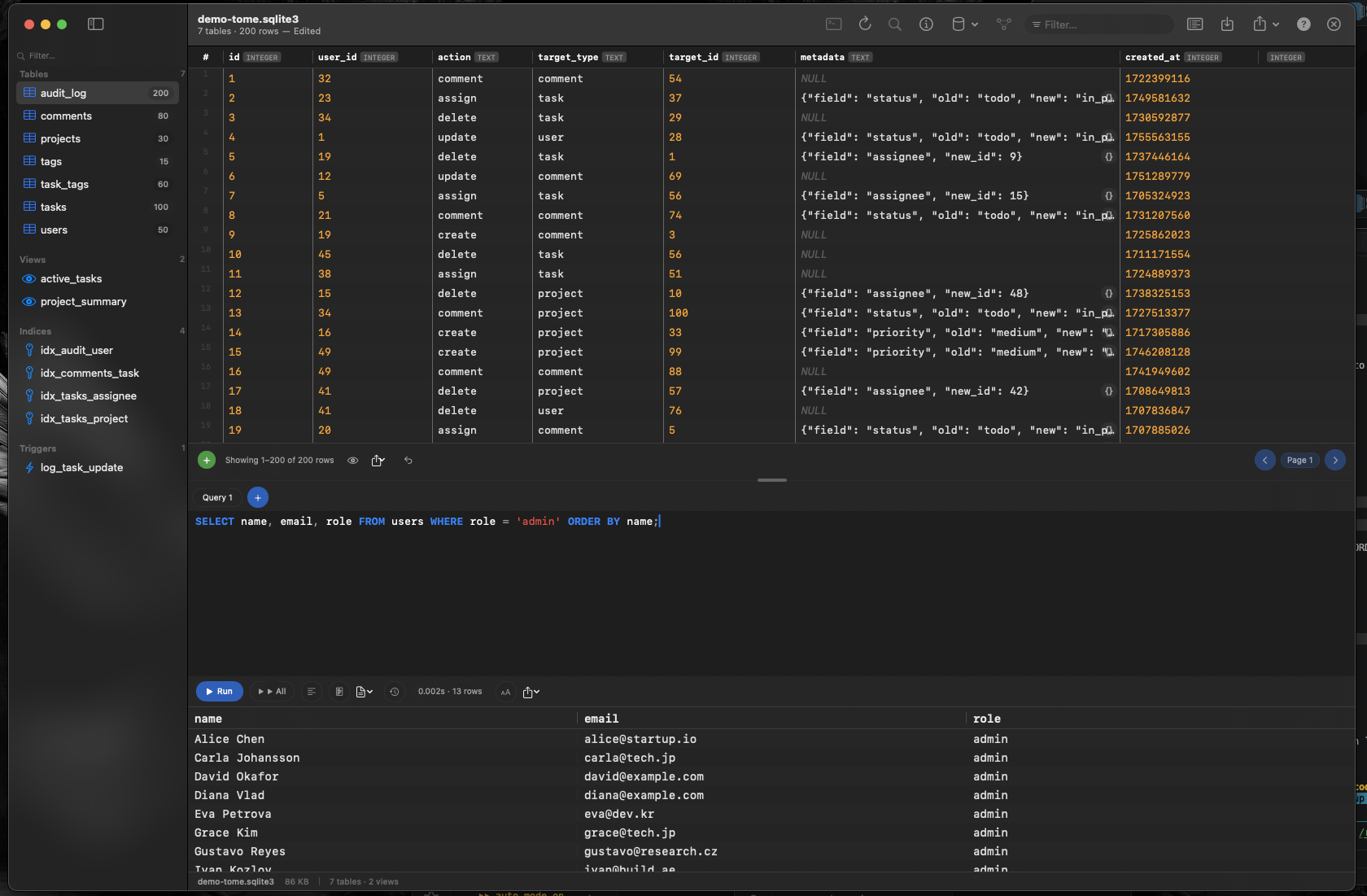
Syntax Highlighting
SQL keywords, table names, string literals, and numbers are color-coded for readability. Spot errors before you run the query instead of parsing a cryptic error message after.
Auto-Complete
Tome knows your schema. Start typing a table name and it suggests completions. Reference a table in a FROM clause and column names appear in suggestions. No more switching between the schema browser and the query editor to remember what a column is called.
Results in a Native Grid
Query results appear in a fast, scrollable native table — not HTML rendered in a web view. Sort columns, resize them, and scroll through large result sets with the performance you expect from a macOS app.
Browse and Query in One App
Tome isn't just a query editor. Browse tables, views, indexes, and triggers in the sidebar. Edit data inline. Create new tables visually. The SQL editor is there when you need it, and the rest of the app handles everything else.