If you've used Postico for PostgreSQL on Mac, you know what a native database client should feel like: instant launch, clean interface, proper macOS integration, and just enough features to be productive without clutter. It's widely regarded as one of the best database tools on the platform. The only problem is that Postico doesn't support SQLite. If your data lives in .sqlite files instead of a PostgreSQL server, you need to find something else — and the "something else" is usually an Electron or Java app that feels nothing like Postico.
The Gap Between Postico and SQLite Tools
Postico proved that a database client can be a great Mac app. It uses native macOS controls, respects system conventions, launches quickly, and stays out of your way. It set a standard that most SQLite browsers haven't met.
DB Browser for SQLite is Qt-based — functional but visually disconnected from macOS. TablePlus supports SQLite but also supports a dozen other databases, bringing complexity that Postico deliberately avoids. DBeaver runs on Java with all the resource overhead that implies. None of these tools deliver the "built for Mac" experience that Postico users expect.
The issue isn't that these are bad tools — they're not. It's that once you've experienced a truly native Mac database client, cross-platform alternatives feel like a compromise. You want the same philosophy applied to a different format.
Tome: The Postico Experience for SQLite
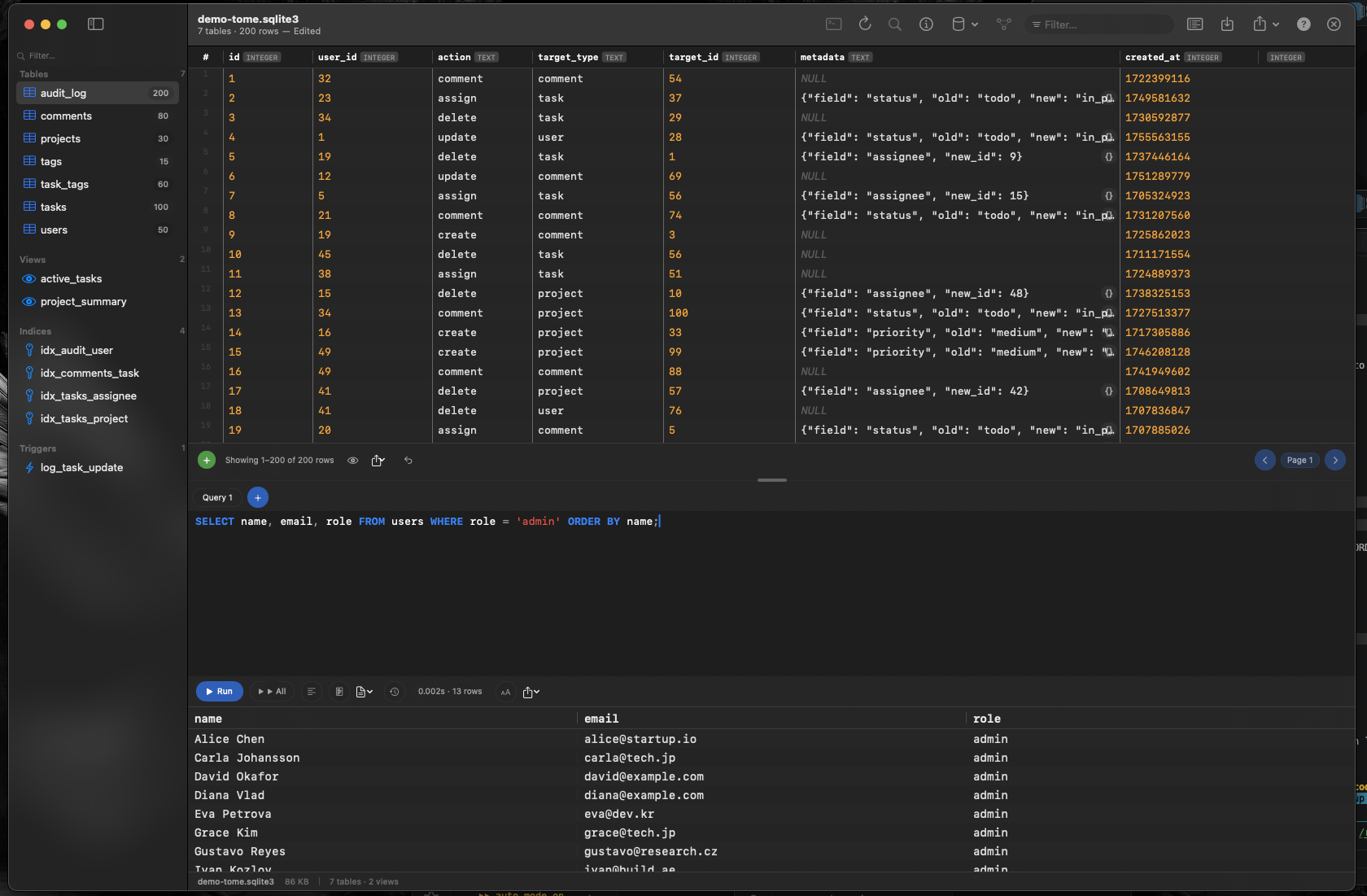
Tome brings the same native Mac quality to SQLite that Postico brings to PostgreSQL. Built with Swift and AppKit, it launches instantly, follows macOS design conventions, and focuses on doing one thing well — browsing and editing SQLite databases.
Same Philosophy, Different Format
Like Postico, Tome is laser-focused. No PostgreSQL, no MySQL, no MongoDB — just SQLite. Every feature is designed for the format you're working with. The interface is clean, the app is fast, and there's nothing extraneous competing for your attention.
Native macOS Experience
Document-based architecture with proper window and tab support. System dark mode. Drag-and-drop from Finder. Keyboard shortcuts that match macOS conventions. Tome behaves like a Mac app because it is one — built with the same frameworks Apple uses for its own applications.
Browse, Edit, and Query
Browse tables, views, indexes, and triggers in the sidebar. Edit cells inline. Insert and delete rows without writing SQL. When you need queries, the built-in editor provides syntax highlighting and auto-complete for your schema. It's everything a SQLite browser needs — and nothing it doesn't.