Name Mangler has been a go-to batch file renamer on Mac for years. It is powerful, it supports regex, and it handles complex rename chains. But it also carries the weight of a design that has not evolved much. If you have tried Name Mangler and found it more complex than it needs to be — or if you are looking for an alternative that feels native to modern macOS — there is a newer option worth considering.
What people like about Name Mangler
Name Mangler earned its reputation for good reasons:
- Regex support for pattern-based renaming
- Multi-step rename chains (called "droplets" and "advanced" mode)
- Preview of file names before applying
- Supports a wide range of rename operations
For power users who learned the interface, it works. But many users report that the UI feels dated, the learning curve is steep for what should be a straightforward task, and simpler workflows require more clicks than expected.
What to look for in an alternative
A good Name Mangler alternative should keep the power — regex, multi-step pipelines, live preview — while making the interface more approachable. Specifically:
- A visual pipeline builder where you can see and reorder steps
- Drag-and-drop file input instead of menu-driven file selection
- Real-time preview that updates as you edit each step
- Full undo support for the entire rename operation
- A native macOS look that does not feel like it was designed ten years ago
Renym as an alternative
Renym covers the same core feature set as Name Mangler — regex find and replace, sequential numbering, insert and remove characters, case changes — but wraps it in a visual pipeline interface.
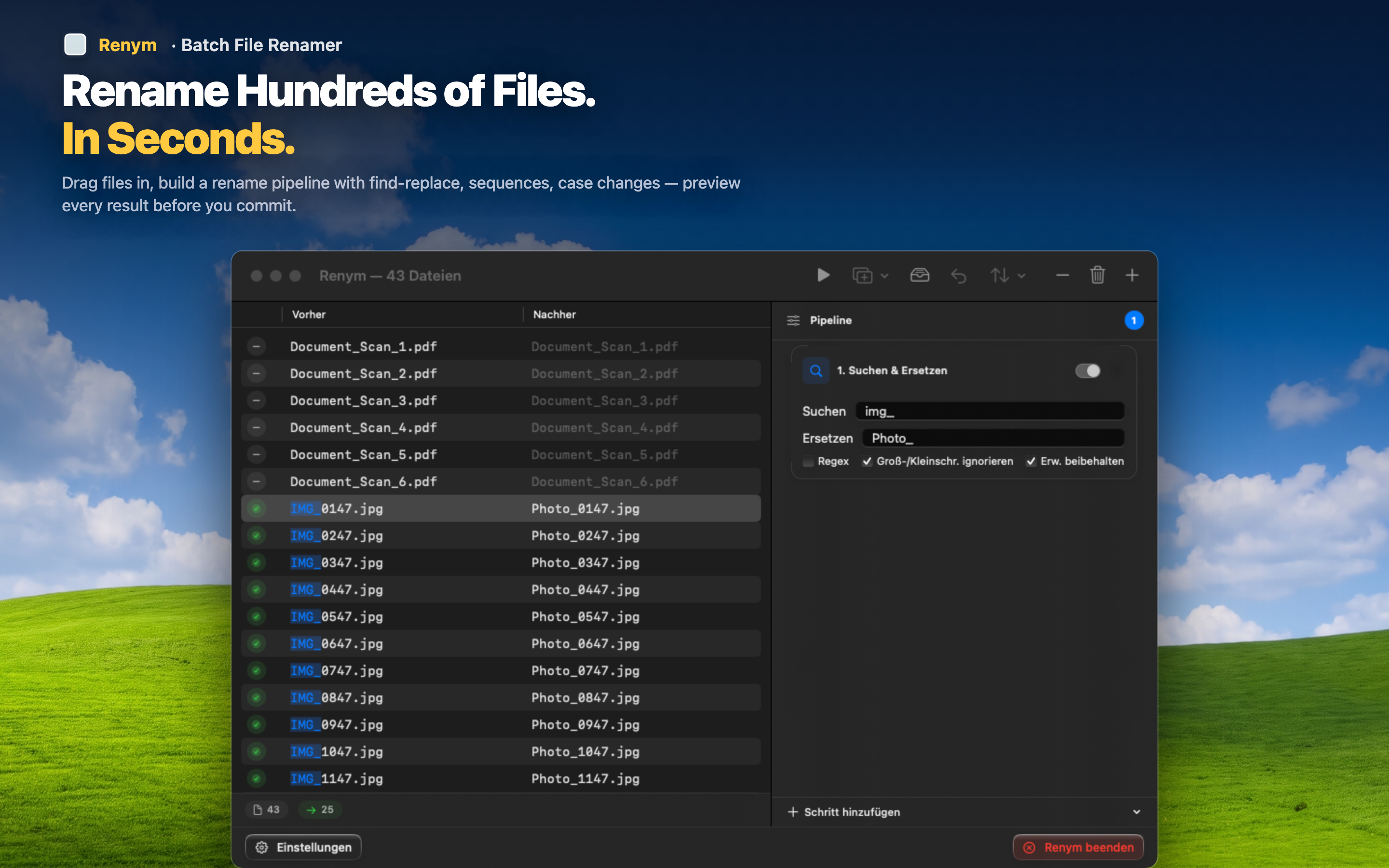
Visual pipeline
Each rename action is a visible step in a pipeline. Drag to reorder, click to edit, delete to remove. You see the chain at a glance without navigating through tabs or dialogs.
Drag-and-drop workflow
Drag files directly into the app. No file-picker dialogs, no menu navigation. Drop a folder or a selection of files and start building your pipeline immediately.
Live before-and-after preview
Every file shows its current name and its new name side by side. Changes update in real time as you edit any step in the pipeline. You see the full result on every file, not just a sample.
Full undo
Applied a rename and the result is not right? Undo the entire batch and try again. No manually reverting 500 file names.
If Name Mangler has been your go-to and you want the same power with a cleaner experience, Renym is worth a look.